Player & Authentication
The Y8 SDK provides authentication and player account functionality for Y8 games.
Players can sign in and out, retrieve their profile information, manage authentication tokens, and—when required—verify player identity with your own backend.
SDK initialization
The examples on this page assume that the Y8 SDK has already been initialized.
Login
Authenticate the current player.
y8Sdk.login();
If authentication succeeds, the onAuth() callback receives the authenticated player.
Call login() straight from the click
Anywhere other than the game's Y8 page — on localhost, on a registered development address, or wherever else your game is embedded — signing in happens in a popup window, and a browser only allows one to open while the click that asked for it is still fresh. Awaiting anything else first spends that allowance and the window is blocked. Safari is the strictest about it: the player presses Login and nothing happens at all.
// Good — login() is the first thing the handler does
button.addEventListener("click", () => y8Sdk.login());

// Blocked — the await spends the click
button.addEventListener("click", async () => {
    await saveProgress();
    y8Sdk.login();
});
Whatever your game does around signing in belongs either before the
click or in the onAuth() callback, not between the click and the call.
JsResponse<Y8User> response = await Y8.Instance.LoginAsync();

if (response.IsSuccess)
{
    Debug.Log($"Logged in as {response.Data.nickname}");
}
Call login() from your Construct 3 Event Sheet.
login();
For example, call Login when the player clicks your Login button.

Y8.login();
If authentication succeeds, the callback provided during Y8.init() is invoked with the updated authentication state.
Logout
Sign the current player out of your game.
y8Sdk.logout();
Logging out clears the SDK's token and player, and also clears the page's
entire sessionStorage — including any keys your game stored there.
await Y8.Instance.LogoutAsync();
Call logout() from your Construct 3 Event Sheet.
logout();
After logout, the C3 authentication state is updated and isLogin becomes false.

Y8.logout();
After signing out, the authentication callback is invoked with the updated authentication state.
Authentication State
Use the authentication callbacks or state provided by your engine to update your game's UI.
Register an authentication callback:
y8Sdk.onAuth((user, error) => {
    if (error) {
        console.error(error);
        return;
    }

    console.log(user);
});
The callback is triggered whenever the player's authentication state changes,
and again after reloadUser().
user is null, with no error, when nobody is signed in at startup and
after logout(). When signing in fails, error is an object with
code: "auth_error" — or, when the popup is blocked or closed, a plain
Error with a message and no code.
Subscribe to authentication errors:
private void OnEnable()
{
    Y8.Instance.OnAuthError += HandleAuthError;
}

private void OnDisable()
{
    Y8.Instance.OnAuthError -= HandleAuthError;
}

private void HandleAuthError(AuthError error)
{
    Debug.LogError($"Authentication failed: {error.message}");
}
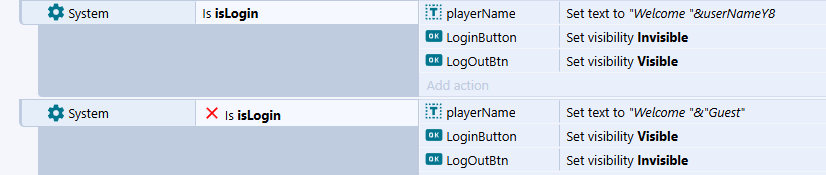
Use the isLogin and userNameY8 global variables.
isLogin = true
    → Player is authenticated
    → Use userNameY8 to display the player's name

isLogin = false
    → Player is not authenticated
    → Display Guest or your login UI
Provide an authentication callback when initializing the SDK:
Y8.init(appId, gameId, updateAuthUI);
private function updateAuthUI(
    loggedIn:Bool,
    username:String
):Void
{
    if (loggedIn)
    {
        trace("Welcome " + username);
    }
    else
    {
        trace("Player is not signed in.");
    }
}
Get Current Player
Retrieve the currently authenticated player's profile.
const user = y8Sdk.getUser();

console.log(user);
Returns null when nobody is signed in.
| Property | Type | Description |
|---|---|---|
pid |
string |
The player's id in your game. It stays the same across sessions and devices, but the same player has a different pid in every other game. |
nickname |
string |
Display name. |
level |
number |
1 if the player has confirmed their email, otherwise 0. |
trust_details |
object |
email: when the player confirmed their email, or null if they have not. |
locale |
string |
The player's language setting, e.g. "en". |
avatars |
object |
Avatar URLs — see below. |
version |
string |
Changes whenever the player edits their profile. |
client_id |
string |
The App ID the player signed in to — yours. |
avatars holds three sizes — thumb_url (32×32), medium_url (50×50) and
large_url (160×160) — each repeated as thumb_secure_url,
medium_secure_url and large_secure_url with the same https URL. Each is
null when the player has no approved picture.
const user = y8Sdk.getUser();

if (user) {
    showName(user.nickname);
    showAvatar(user.avatars.medium_secure_url);
}
An app that Y8 has granted access to further profile fields — email,
first_name, last_name, dob, language, gender, about_me — also
receives those.
This is display data, not proof of identity
Everything here lives in the player's browser and can be edited by
whoever is playing — the pid included. Use it to greet someone by name
and show their avatar.
If your game has its own backend, never send this pid to it as
identity. See Verifying Players.
JsResponse<Y8User> response =
    await Y8.Instance.GetUserAsync();

if (response.IsSuccess)
{
    Debug.Log(response.Data.nickname);
}
A synchronous version is also available:
Y8User user = Y8.Instance.GetUser();

if (user != null)
{
    Debug.Log(user.nickname);
}
Returns null when nobody is signed in.
| Property | Type | Description |
|---|---|---|
pid |
string |
The player's id in your game. It stays the same across sessions and devices, but the same player has a different pid in every other game. |
nickname |
string |
Display name. |
level |
int |
1 if the player has confirmed their email, otherwise 0. |
locale |
string |
The player's language setting, e.g. "en". |
avatars |
Avatars |
Avatar URLs — see below. |
first_name, gender, language, dob |
string |
Only when Y8 has granted your app these fields; otherwise null. |
avatars holds three sizes — thumb_url (32×32), medium_url (50×50) and
large_url (160×160) — each repeated as thumb_secure_url,
medium_secure_url and large_secure_url with the same https URL. Each is
null when the player has no approved picture.
Y8User user = Y8.Instance.GetUser();

if (user != null)
{
    Debug.Log(user.nickname);
    Debug.Log(user.avatars.medium_secure_url);
}
Y8User carries only the fields above. Its access_token field is never
filled — see Get Access Token.
This is display data, not proof of identity
Everything here lives in the player's browser and can be edited by
whoever is playing — the pid included. Use it to greet someone by name
and show their avatar.
If your game has its own backend, never send this pid to it as
identity. See Verifying Players.
getUser();
You can store the returned player data in a Construct 3 variable.
GetUserBtn → On clicked
           → Set y8UserData to Functions.getUser


getUser returns the player as a JSON string, or an empty string ("")
when nobody is signed in. Load it into a JSON object to read the fields — for
example JSON.Get("nickname") or JSON.Get("avatars.medium_secure_url").
| Property | Type | Description |
|---|---|---|
pid |
string |
The player's id in your game. It stays the same across sessions and devices, but the same player has a different pid in every other game. |
nickname |
string |
Display name. |
level |
number |
1 if the player has confirmed their email, otherwise 0. |
trust_details |
object |
email: when the player confirmed their email, or null if they have not. |
locale |
string |
The player's language setting, e.g. "en". |
avatars |
object |
Avatar URLs — see below. |
version |
string |
Changes whenever the player edits their profile. |
client_id |
string |
The App ID the player signed in to — yours. |
avatars holds three sizes — thumb_url (32×32), medium_url (50×50) and
large_url (160×160) — each repeated as thumb_secure_url,
medium_secure_url and large_secure_url with the same https URL. Each is
null when the player has no approved picture.
An app that Y8 has granted access to further profile fields — email,
first_name, last_name, dob, language, gender, about_me — also
receives those.
This is display data, not proof of identity
Everything here lives in the player's browser and can be edited by
whoever is playing — the pid included. Use it to greet someone by name
and show their avatar.
If your game has its own backend, never send this pid to it as
identity. See Verifying Players.
var user = Y8.getUser();
Returns null when nobody is signed in, or before the SDK is ready.
| Property | Type | Description |
|---|---|---|
pid |
String |
The player's id in your game. It stays the same across sessions and devices, but the same player has a different pid in every other game. |
nickname |
String |
Display name. |
level |
Int |
1 if the player has confirmed their email, otherwise 0. |
trust_details |
Dynamic |
email: when the player confirmed their email, or null if they have not. |
locale |
String |
The player's language setting, e.g. "en". |
avatars |
Dynamic |
Avatar URLs — see below. |
version |
String |
Changes whenever the player edits their profile. |
client_id |
String |
The App ID the player signed in to — yours. |
avatars holds three sizes — thumb_url (32×32), medium_url (50×50) and
large_url (160×160) — each repeated as thumb_secure_url,
medium_secure_url and large_secure_url with the same https URL. Each is
null when the player has no approved picture.
var user = Y8.getUser();

if (user != null)
{
    showName(user.nickname);
    showAvatar(user.avatars.medium_secure_url);
}
An app that Y8 has granted access to further profile fields — email,
first_name, last_name, dob, language, gender, about_me — also
receives those.
This is display data, not proof of identity
Everything here lives in the player's browser and can be edited by
whoever is playing — the pid included. Use it to greet someone by name
and show their avatar.
If your game has its own backend, never send this pid to it as
identity. See Verifying Players.
Reload Player
Refresh the player's information from Y8.
y8Sdk.reloadUser()
    .then((user) => {
        console.log(user);
    })
    .catch((error) => {
        console.error(error);
    });
JsResponse<Y8User> response =
    await Y8.Instance.ReloadUserAsync();

if (response.IsSuccess)
{
    Debug.Log(response.Data.nickname);
}
If the reload fails, the cached player is cleared as well: GetUser()
returns null, and calls that need a signed-in player are skipped, until
GetUserAsync() or a new sign-in restores it.
reloadUser();
After the player information is reloaded, the onUserReloaded function is triggered.
On function onUserReloaded
    → Use userdata


userdata is the player as a JSON string — the same as getUser returns —
or an empty string if the reload failed. The event-sheet function that starts
the reload is named reloaduser.
Y8.reloadUser();
Nothing is returned. The refreshed player reaches the callback provided
during Y8.init().
Use this method when your game needs the latest player information after account changes.
Authentication Tokens
Authentication tokens allow your game to securely authenticate the player.
Get Token
Retrieve the current authentication token.
const token = y8Sdk.getToken();
Returns null when nobody is signed in.
| Property | Type | Description |
|---|---|---|
access_token |
string |
The access token — see Get Access Token. |
token_type |
string |
Always "bearer". |
expires_in |
number |
Seconds the access token was valid for when it was issued. |
refresh_token |
string |
Only on the token from signing in; a token returned by refreshToken() has none. |
scope |
string |
Omitted when empty. |
JsResponse<Y8Token> response =
    await Y8.Instance.GetTokenAsync();

if (response.IsSuccess)
{
    Debug.Log(response.Data.token_type);
}
A synchronous version is also available:
Y8Token token = Y8.Instance.GetToken();

if (token != null)
{
    Debug.Log(token.token_type);
}
GetToken() returns null until GetTokenAsync() or RefreshTokenAsync()
has completed at least once.
Y8Token has the fields access_token, token_type (always "bearer"),
expires_in, refresh_token and scope, as described in the JavaScript tab.
getToken();


You can store the returned token in a Construct 3 variable. It is a JSON
string with the fields access_token, token_type (always "bearer"),
expires_in, refresh_token and scope, or the string "null" when nobody
is signed in.
var token = Y8.getToken();
Returns null when nobody is signed in. Otherwise the token has the fields
access_token, token_type (always "bearer"), expires_in,
refresh_token and scope, as described in the JavaScript tab.
Refresh Token
Refresh the current authentication token.
y8Sdk.refreshToken()
    .then((token) => {
        console.log(token);
    })
    .catch((error) => {
        console.error(error);
    });
JsResponse<Y8Token> response = await Y8.Instance.RefreshTokenAsync();
refreshToken();

refreshToken returns nothing. The new token is passed to the
onTokenRefreshed function as its token parameter — a JSON string, or an
empty string if the refresh failed. You can store it in a Construct 3
variable from there.
Y8.refreshToken();
Nothing is returned and there is no completion callback; Y8.getToken()
returns the new token once the refresh has finished.
Get Access Token
The access token is what proves to your own server that a player is who they say they are. It is the only player-related value that is safe to send outside the SDK.
const accessToken = y8Sdk.getAccessToken();
Returns null when nobody is signed in, so call it once authentication has
been reported.
Send this, not the full token
getToken() returns the whole token object, including the refresh
token — a credential that can mint new access tokens and must never
leave the SDK. getAccessToken() returns only the single string your
server needs.
Sending the token is only half of it; your server then has to check it. See Verifying Players for what to do with it.
There is no separate method; read it from the token:
JsResponse<Y8Token> response = await Y8.Instance.GetTokenAsync();

string accessToken = response.IsSuccess ? response.Data.access_token : null;
Send access_token, not the whole token
Y8Token is the whole token, including the refresh token — a
credential that can mint new access tokens and must never leave the
game. Send only access_token.
See Verifying Players for what your server does with it.
There is no separate function; read it from the token. Functions.getToken
returns the whole token as a JSON string ("null" when nobody is signed in).
Load it into a JSON object and take JSON.Get("access_token").
Send access_token, not the whole token
The JSON string from getToken includes the refresh token — a
credential that can mint new access tokens and must never leave the
game. Send only the access_token value, never the string itself.
See Verifying Players for what your server does with it.
There is no separate method; read it from the token:
var token = Y8.getToken();
var accessToken:String = token != null ? token.access_token : null;
Send access_token, not the whole token
Y8.getToken() returns the whole token, including the refresh
token — a credential that can mint new access tokens and must never
leave the game. Send only access_token.
See Verifying Players for what your server does with it.