Advertising
Advertising is how most games on Y8 earn. The SDK shows two kinds of break: interstitials, which you request at natural pauses in play, and rewarded ads, which the player chooses to watch in exchange for something. It can also show banners, which stay on screen during play in a space your game sets aside for them.
For rules on permitted ad placements, see the Ad placement guidelines.
Pause in the callback, not before the call
This is the one thing to get right, because getting it wrong strands players in a paused game.
An ad break does not always show an ad. It may be skipped because none was available, or because the previous ad was too recent. When that happens the SDK does not fire the "ad started" and "ad finished" callbacks at all — there was no ad to start or finish.
So pause your game inside the before-ad callback and resume it inside the after-ad callback. If you instead pause before requesting the break, a skipped break leaves the game paused with nothing to un-pause it.
Tip
Mute your audio in the same place you pause, and restore it in the same place you resume.
Showing an interstitial
y8Sdk.showAd({
    type: "next",
    name: "level-complete",

    beforeAd: () => {
        pauseGame();
    },

    afterAd: () => {
        resumeGame();
    },

    adBreakDone: (info) => {
        console.log(info.breakStatus);
    },
}).catch((error) => {
    console.error(error);
});
Every field is optional. type defaults to "start" and name to
"start-game".
name is a label for the break. On games whose ads run through AdSense for
Platforms it is passed to Google with the break; Y8 does not report on it.
Keep it stable.
JsResponse<AdBreakInfo> response =
    await Y8.Instance.ShowAdAsync(AdType.next, "level-complete");

if (response.IsSuccess)
{
    Debug.Log(response.Data.Status);
}
type defaults to AdType.start; name is optional. Y8 does not report on
it.
Pause and resume by subscribing to the SDK's events rather than doing it around the call — they fire only when an ad actually appears, which is the behaviour described above:
private void OnEnable()
{
    Y8.Instance.OnAdPauseGame  += PauseGame;
    Y8.Instance.OnAdResumeGame += ResumeGame;
}

private void OnDisable()
{
    Y8.Instance.OnAdPauseGame  -= PauseGame;
    Y8.Instance.OnAdResumeGame -= ResumeGame;
}

private void PauseGame()  => Time.timeScale = 0f;
private void ResumeGame() => Time.timeScale = 1f;
Subscribe once, at startup — not per ad request.
Call showAds
    type: "next"
    name: "level-complete"

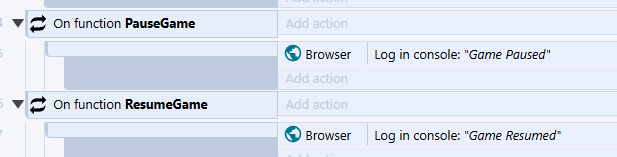
The integration calls your PauseGame function when an ad is about to show
and your ResumeGame function when the break ends. In the example project
both only log a message — fill them in to pause and mute your game, and to
resume it.
Y8.showAd(pauseGame, resumeGame);
| Parameter | Type | Description |
|---|---|---|
pauseGame |
Void->Void |
Called before the ad is displayed. Pause and mute here. |
resumeGame |
Void->Void |
Called when the break ends, whether or not an ad was shown. Resume here. |
pauseGame runs only when an ad is about to show. resumeGame runs at the
end of every break, including one that was skipped, so it must be safe to
call when the game was never paused.
The Haxe wrapper always requests the start placement; it has no way to
choose another one.
Placements
The placement describes when the break happens. Pick the one that matches what the player is actually doing; the ad system uses it to decide what to serve.
| Placement | When to use |
|---|---|
start |
When the player presses Play. |
pause |
The player paused the game. |
next |
Between levels, rounds or stages. |
browse |
The player is in menus, not playing. |
reward |
The player chose to watch an ad for a reward. |
Never request preroll
preroll is a placement the Y8 platform runs itself, before your game's UI
appears. Requesting it from the SDK is not supported.
The method is showAd, not adBreak
adBreak is the name Google's own ad API uses, and it is easy to reach for
by mistake — but it does not exist on the Y8 SDK: y8Sdk.adBreak() throws a
TypeError. An adBreak() helper copied from Google's documentation is
worse, because it bypasses the SDK and on most Y8 games does nothing at all,
with no ad and no error. If ads are not appearing, check the method name
first.
Rewarded ads
A rewarded ad is player-initiated: they press a button offering something in exchange for watching. Grant the reward only when the ad was actually watched through to the end.
y8Sdk.showAd({
    type: "reward",
    name: "extra-life",

    beforeAd: () => pauseGame(),
    afterAd: () => resumeGame(),

    beforeReward: (showAdFn) => showAdFn(),

    adViewed: () => {
        grantExtraLife();
    },

    adDismissed: () => {
        // Watched only part of it — no reward.
    },

    adBreakDone: (info) => {
        console.log(info.breakStatus);
    },
}).catch((error) => {
    console.error(error);
});
beforeReward must call the function it is given
beforeReward runs when a rewarded ad is ready and receives a function
that displays it. Nothing is shown unless you call that function.
It is the hook for asking "Watch an ad for an extra life?" — show your
own prompt, then call showAdFn() if the player accepts. If you do not
need to ask, pass it straight through as above.
It is not where you grant the reward. Grant in adViewed.
| Callback | When it runs |
|---|---|
beforeReward(showAdFn) |
A rewarded ad is available. Call showAdFn() to play it. |
adViewed |
The player watched it through. Grant the reward here. |
adDismissed |
The player closed it early. Grant nothing. |
beforeReward, adViewed and adDismissed are ignored for every placement
other than reward.
JsResponse<AdBreakInfo> response =
    await Y8.Instance.ShowAdAsync(AdType.reward, "extra-life");

if (!response.IsSuccess)
{
    return;
}

switch (response.Data.Status)
{
    case AdBreakStatus.Viewed:
        GrantExtraLife();
        break;

    case AdBreakStatus.Dismissed:
        // Closed early — grant nothing.
        break;

    case AdBreakStatus.NoFill:
        // Nothing available right now; tell the player to try later.
        break;

    case AdBreakStatus.Error:
        break;
}
There is no separate "offer the ad" hook — show your own prompt before
calling ShowAdAsync, and call it only if the player accepts.
RewardAd → On clicked
         → Call showRewardAds
            functionName: "addCoinsReward"


The named function runs only when the ad was watched through, so grant the reward there and nowhere else:
On function addCoinsReward
    → Grant the player their reward

Two more functions in the y8Api event sheet report the other outcomes:
| Function | When it runs |
|---|---|
rewardAdDismissed |
The player closed the ad early. Grant nothing. |
NoRewardAds |
The break ended without showing an ad. A good place to tell the player to try again later. |
Y8.showRewardAd(
    pauseGame,
    resumeGame,
    function():Void {
        coins += 100;
        trace("Reward granted");
    },
    function():Void {
        trace("No rewarded ad available");
    }
);
| Parameter | Type | When it runs |
|---|---|---|
pauseGame |
Void->Void |
Before the ad is displayed. |
resumeGame |
Void->Void |
When the break ends, whether or not an ad was shown. |
onReward |
Void->Void |
The ad was watched through. Grant the reward here. |
onUnavailable |
Void->Void |
No rewarded ad was available (noAdPreloaded, frequencyCapped or other), or the request failed. Not called when the break ends as timeout, notReady, error or ignored — only resumeGame runs then. |
onReward does not run when the player closes the ad early, so granting
there is safe.
Knowing what happened
The ad-break-done callback runs for every break the SDK accepts, whether or not
an ad was shown, and describes the outcome. It does not run when the call itself
fails (see the .catch() above), or when an ad blocker stops the ad system from
loading at all — then no callback runs, which is one more reason to resume in
the after-ad callback rather than only here.
adBreakDone: (info) => {
    // info.breakStatus is always set — what actually happened.
    //
    // On games whose ads run through AdSense for Platforms and whose
    // files are on Y8, info also carries breakType ("next"), breakName
    // ("level-complete") and breakFormat ("interstitial" or "reward").
    //
    // On every other game (including one served from your own site),
    // and on a frequency-capped break, info is just:
    // { breakStatus: "viewed" }
}
breakStatus |
Meaning |
|---|---|
viewed |
Shown and watched. |
dismissed |
Shown, closed early. |
noAdPreloaded |
Nothing available to show. |
frequencyCapped |
Skipped — the previous ad was too recent. |
notReady |
The ad system had not finished starting up. |
timeout |
The request took too long. |
error |
The request failed. |
ignored |
A rewarded ad was offered, but showAdFn was not called before the next break was requested. |
other |
Anything else. |
Only viewed and dismissed mean an ad appeared. Treat every other value
the same way — carry on with the game.
JsResponse<AdBreakInfo> response = await Y8.Instance.ShowAdAsync(AdType.next);
AdBreakStatus status = response.Data.Status;
AdBreakStatus |
breakStatus |
Meaning |
|---|---|---|
Viewed |
viewed |
Shown and watched. |
Dismissed |
dismissed |
Shown, closed early. |
NoFill |
noAdPreloaded, frequencyCapped, other |
No ad appeared. Also returned when no Game ID is set, or while another ad break is still in progress. |
Error |
timeout, notReady, ignored, error, anything else |
No ad appeared; the break failed or timed out. |
Only Viewed and Dismissed mean an ad was shown. NoFill and Error
mean the same thing for your game — no ad was shown, carry on.
The integration reports the outcome through the functions described above:
the reward function runs only on a completed rewarded ad,
rewardAdDismissed when it was closed early, NoRewardAds when none was
shown, and ResumeGame once the break is over either way.
The wrapper reports the outcome through the callbacks described above:
onReward for a completed rewarded ad, onUnavailable when none was
available or the request failed, and resumeGame once the break is over
either way — including breaks that end as timeout, notReady, error or
ignored, where neither of the other two runs.
Frequency capping
Interstitials are paced. By default Y8 allows one roughly every 180 seconds, configurable per game. Rewarded ads are never capped, though watching one does restart the interval for interstitials.
Call the SDK at every break the ad placement guidelines allow. You do not need to do the counting — when a request lands inside the interval, the SDK skips it and reports the outcome as capped without showing anything.
A capped break behaves exactly like one where no ad was available: the before-ad and after-ad callbacks do not run, so a game that pauses inside them is never paused in the first place. Handle it the same way you handle an empty break — which, if you followed the advice at the top of this page, means doing nothing at all.
Games served from your own site
Some builds don't contain the game itself: the uploaded index.html loads it in
an iframe from the developer's own site, often so a multiplayer client stays in
step with its servers. The SDK then runs on your domain rather than on Y8's.
Interstitial and rewarded ads still work, from SDK version 2.14, or 2.17 if your
game earns through your own AdSense account (AdSense for Platforms). The SDK
notices it is running outside Y8 and asks the Y8 game page to show each break
instead. Your code does not change: the same calls, the same callbacks, in the
same order. Only the ad-break-done callback gets less: just breakStatus.
The ad covers your game's area, as it does for a game whose files are on Y8.
Y8's own fullscreen button keeps the player in fullscreen through the ad; if
your game makes its own frame fullscreen instead, the player is taken out of
that fullscreen for the ad, since it would hide the ad.
Banners work there too, from SDK version 2.15 (2.17 with AdSense for Platforms): the Y8 game page lays each banner over the element you reserved for it, instead of the SDK drawing it inside your game. The calls, sizes and limits are the same. For the banner to line up with your element:
-
The frame that runs the SDK must fill the uploaded page, from its top-left corner. For example, in your uploaded
index.html:<style> html, body { margin: 0; height: 100%; } iframe { display: block; width: 100%; height: 100%; border: 0; } </style> <iframe src="https://yourgame.io/"></iframe>The page places the banner by where your element sits in that frame, so a frame with a margin, a border or a different size puts the banner in the wrong place.
-
The banner hides while your page covers it. When an element of your page, such as a menu or a dialog, lies over any part of the banner's element, the whole banner is hidden, and it shows again once nothing covers it. A request made meanwhile rejects with
notVisible, and the banner does not refresh while it is hidden. This differs from a game whose files are on Y8: there the banner is part of your page, so your UI covers only the part it overlaps, and the rest stays visible and keeps refreshing. Here the banner belongs to the Y8 page, which your UI cannot draw over, so it is hidden instead.An element counts even when it is transparent; an element with
pointer-events: nonedoes not. UI drawn inside a canvas is not an element, so the SDK cannot see it, and the banner stays above it, as it does in a game whose files are on Y8. While such UI is under the banner's element, hide the element (the banner hides with it and comes back when you show it) or clear the banner.A transparent layer that catches touches across the whole game covers the banner too. Stack the banner's element above that layer and below your menus and dialogs, the order a banner in a game whose files are on Y8 needs anyway to receive clicks. Give the element
pointer-events: noneif the layer should still get touches there while no banner shows; the banner still shows.If you can't stack it that way, for example because one layer takes all input, request the banner with
autoHide: falseto keep it above everything:y8Sdk.requestBanner({ id: "banner-bottom", width: 728, height: 90, autoHide: false });Anything you draw over its element then ends up under the banner.
The banner follows the element when it moves, is hidden while the element is
hidden or off screen, and goes away when the element is removed. Y8's own
fullscreen button keeps banners on screen; while your game has its own frame in
fullscreen they are hidden, and requestBanner rejects with notVisible.
Older SDK versions
Before 2.15, banners in a game served from your own site are drawn inside your game and requested from your domain, where Y8 is not authorised to sell ads. They will not earn.
In 2.15, banners do not hide while your page covers them: they stay above
your game, as with autoHide: false, so anything you draw over their
element ends up under them.
Before 2.17, a game that earns through your own AdSense account shows its breaks and banners inside your game, requested from your domain rather than from y8.com, the site your AdSense account is linked to for Y8.
Banners
A banner is a display ad that stays on screen while the player plays: in a sidebar, a strip under the board, a lobby panel. It is not a break. Nothing pauses, and the ad appears inside an element your game reserves for it.
In-game banner ads require Y8 approval for each game
We generally consider them for games with long, continuous sessions and few natural breaks for video ads, such as some io and multiplayer games. Approved banners must be served through the Y8 SDK, remain clearly separate from game controls, and work safely on every supported screen size. Y8 may limit, disable, or withdraw banner approval if placement harms gameplay, causes accidental clicks, or affects ad quality. Adding banner code does not guarantee that banners will be shown.
While your game is in draft or in review, banners show test ads whether it
is approved or not, so you can build and check your placement first. Once
the game is released, banners appear only if Y8 has approved them;
otherwise requestBanner rejects with bannersUnavailable. The SDK also
logs a warning in the browser console until the game is approved. Contact
Y8 support to have banners approved before you release the game.
| Size | Name |
|---|---|
| 728×90 | Leaderboard |
| 300×250 | Medium |
| 320×50 | Mobile |
| 468×60 | Main |
| 320×100 | Large Mobile |
The element you reserve must be at least the size of the banner and fully on screen when you ask for one: not hidden, and not positioned or scrolled out of view. Put nothing else inside it. The ad is placed there and centred horizontally. In a game served from your own site, the Y8 page lays the banner over the element instead; see Games served from your own site for what that needs.
Requires SDK 2.13.0 or later
<div id="banner-bottom" style="width: 728px; height: 90px;"></div>
y8Sdk.requestBanner({ id: "banner-bottom", width: 728, height: 90 })
    .then(() => {
        // A banner is showing.
    })
    .catch((error) => {
        console.log(error.code);
    });

// Remove it when you need the space for something else.
y8Sdk.clearBanner("banner-bottom");

// Or remove every banner at once, for example when a match starts.
y8Sdk.clearAllBanners();
requestBanner resolves once an ad is showing. When it cannot show one it
rejects with an error whose code says why:
code |
Meaning |
|---|---|
bannersUnavailable |
Banners are not available or not approved for this game, or init() was called without an ad configuration. |
missingId |
No id was given, or no element has that id. |
invalidSize |
Not one of the sizes above, or the element is smaller than the banner. |
notVisible |
The element is hidden or not fully on screen, or the tab is in the background. |
videoAdPlaying |
An interstitial or rewarded ad is on screen. |
bannerCooldown |
A banner of this size was requested too recently. |
maxRefreshReached |
This size has used up its banners for the session. |
unfilled |
No ad was available this time. Not reported on every game (see the tip below). |
other |
Anything else, including ads failing to start up. message has the details. |
A request declined before it is sent — every code except unfilled and
other — leaves the banner already in that element where it is. Once a new
banner is requested, it replaces the old one even if it then comes back
unfilled.
Requires the Unity SDK package 2.1.0 or later
The banner is drawn over the Unity canvas, centred on the element you
reserve: an empty UI element (a RectTransform) laid out where the banner
should go, at least the size of the banner on screen. With a Canvas
Scaler, check that at the smallest window size you support. Add a
Y8BannerSlot component to the element and pick its Size, then:
[SerializeField] private Y8BannerSlot bannerSlot;

JsResponse<BannerResult> response = await bannerSlot.RequestAsync();

if (!response.IsSuccess)
{
    Debug.Log(response.Data.code);
}

// Remove it when you need the space for something else.
bannerSlot.Clear();

// Or remove every banner at once, for example when a match starts.
Y8.Instance.ClearAllBanners();
While a banner shows, it follows the element as your UI moves or resizes,
and disabling the element removes it. Tick RequestOnEnable to request a
banner whenever the element is enabled. Without the component, call
Y8.Instance.RequestBannerAsync(id, size, rectTransform),
MoveBanner(id, rectTransform) and ClearBanner(id) yourself, where id
is any name you give the slot.
The banner sits on top of the canvas and takes the clicks there, so keep buttons and anything else the player needs clear of the element.
When no banner can be shown, response.Data.code says why:
code |
Meaning |
|---|---|
bannersUnavailable |
Banners are not available or not approved for this game, or no Game ID is set on Y8_Root. |
missingId |
RequestBannerAsync was called with an empty id. |
invalidSize |
The element is smaller on screen than the banner. |
notVisible |
The element is inactive or not fully on screen, or the tab is in the background. |
videoAdPlaying |
An interstitial or rewarded ad is on screen. |
bannerCooldown |
A banner of this size was requested too recently. |
maxRefreshReached |
This size has used up its banners for the session. |
unfilled |
No ad was available this time. Not reported on every game (see the tip below). |
other |
Anything else, including ads failing to start up. response.Data.message has the details. |
A request declined before it is sent — every code except unfilled and
other — leaves the banner already in that slot where it is. Once a new
banner is requested, it replaces the old one even if it then comes back
unfilled.
Requires the integration's main.js from 26 October 2026 or later
If you copied main.js before then, copy it again from the
example project.
The banner is drawn over the game canvas, centred on an object you place where it should go (an invisible Sprite works), at least the size of the banner on screen. Request it from a script action, with a banner id of your choice, the size and the object's name:
requestBanner("bottom", 728, 90, "BannerSpot");
The result comes back through two functions you add to your event sheet:
| Function | When it runs |
|---|---|
onBannerShown(id) |
The banner is showing. |
onBannerFailed(id, errorCode) |
No banner could be shown; errorCode says why (see below). |
The banner follows the canvas when the window resizes. When your game moves
the object, call moveBanner("bottom", "BannerSpot"); no new ad is
requested. Remove a banner with clearBanner("bottom"), or every banner at
once with clearAllBanners(), for example when a match starts. Only the
object's first instance is used.
The banner sits on top of the canvas and takes the clicks there, so keep buttons and anything else the player needs clear of the object.
errorCode |
Meaning |
|---|---|
bannersUnavailable |
Banners are not available or not approved for this game, or the SDK has not started yet. |
missingId |
The banner id is empty. |
invalidSize |
Not one of the sizes above, or the object is smaller on screen than the banner. |
notVisible |
No instance of that object exists, the object is not fully on screen, or the tab is in the background. |
videoAdPlaying |
An interstitial or rewarded ad is on screen. |
bannerCooldown |
A banner of this size was requested too recently. |
maxRefreshReached |
This size has used up its banners for the session. |
unfilled |
No ad was available this time. Not reported on every game (see the tip below). |
other |
Anything else, including ads failing to start up. The browser console has the details. |
A request declined before it is sent — every code except unfilled and
other — leaves the banner already under that id where it is. Once a new
banner is requested, it replaces the old one even if it then comes back
unfilled.
Requires the wrapper's y8 folder from 26 October 2026 or later
If you added it before then, copy it again from the Haxe SDK.
The banner is drawn over the game canvas, centred on a placeholder you
reserve where it should go, at least the size of the banner on screen.
With OpenFL, the placeholder is a display object on the stage (an empty
Sprite works):
Y8.requestBannerFor("bottom", 728, 90, bannerPlaceholder, function(error:String):Void {
    if (error != null) {
        trace(error);
    }
});

// When the placeholder moves. No new ad is requested.
Y8.moveBannerTo("bottom", bannerPlaceholder);

// Remove it when you need the space for something else.
Y8.clearBanner("bottom");

// Or remove every banner at once, for example when a match starts.
Y8.clearAllBanners();
The callback gets null once the banner shows, and otherwise the error
code. The banner follows the canvas when the window resizes; when your game
moves the placeholder, call moveBannerTo.
Without OpenFL, describe the placeholder with a Y8BannerPlacement: its
x, y, width and height in your game's coordinates, inside a game
area of areaWidth × areaHeight that covers the whole canvas. Then call
Y8.requestBanner(id, width, height, placement, callback) and
Y8.moveBanner(id, placement).
The banner sits on top of the canvas and takes the clicks there, so keep buttons and anything else the player needs clear of the placeholder.
| Error code | Meaning |
|---|---|
bannersUnavailable |
Banners are not available or not approved for this game, or the SDK has not started yet. |
missingId |
The banner id is empty. |
invalidSize |
Not one of the sizes above, the placeholder is smaller on screen than the banner, or the placement is incomplete. |
notVisible |
The placeholder is not on the stage or not fully on screen, or the tab is in the background. |
videoAdPlaying |
An interstitial or rewarded ad is on screen. |
bannerCooldown |
A banner of this size was requested too recently. |
maxRefreshReached |
This size has used up its banners for the session. |
unfilled |
No ad was available this time. Not reported on every game (see the tip below). |
other |
Anything else, including ads failing to start up. |
A request declined before it is sent — every code except unfilled and
other — leaves the banner already under that id where it is. Once a new
banner is requested, it replaces the old one even if it then comes back
unfilled.
How often banners change
Banners are paced per size. By default each size allows one new banner every 180 seconds, configurable per game and never less than 30 seconds, and a limited number per session. Every banner of that size counts, whether you asked for it or it refreshed by itself, and removing a banner does not reset the count.
Depending on how the game is set up, a banner either refreshes by itself while it stays on screen, or changes only when you request a new one. Write the game so that either works: request a new banner at natural breaks, such as between matches or back in the lobby. A request that comes too soon is simply declined, and the banner already showing stays where it is.
If your game earns through your own AdSense account (AdSense for Platforms), its banners come from AdSense and never refresh by themselves. AdSense forbids refreshing an ad without a user action, so request a new banner only on a change the player made, such as starting the next match or going back to the lobby, never on a timer.
No banner is requested or refreshed while an interstitial or rewarded ad is on screen, and banners never count towards the interstitial pacing described above.
Design for an empty space
Sometimes no banner is available. Keep the reserved space in your layout either way, so nothing jumps when an ad does or does not appear.
If your game earns through your own AdSense account (AdSense for
Platforms) and its files are on Y8, its banners come from AdSense, which
can't tell the SDK when an ad stays empty. On those games requestBanner
resolves once the ad has loaded, and unfilled never comes, so an empty
banner space has to look right without the game being told. Served from
your own site, the same game does get unfilled (SDK 2.17 or later).
Testing
While your game is in draft or in review, interstitials and banners are served Y8's own house ads automatically — or Google's test ads, on games whose ads run through AdSense for Platforms. There is nothing to switch on, and no configuration to remember to remove — real ads begin serving once the game is approved and released. Banners need one more step: after release they appear only once Y8 has approved banners for the game (see Banners).
In a draft or in-review build, a break that shows no ad also opens a panel over your game saying so, and why — no ad available, frequency capped, and so on. Close it and carry on. It is there so an empty break is visible while you test; live games never show it.
Before submitting, check that:
- Gameplay pauses and audio mutes when an ad appears.
- Gameplay resumes afterwards.
- A break that shows no ad leaves the game running normally. Breaks are capped after the first ad that actually shows, so requesting two breaks in quick succession is an easy way to see this path. A first break that showed nothing does not start the cap.
- Rewards are granted only after an ad is watched through, never when it is closed early.
- If you show banners: each one appears inside its reserved space, and the layout still looks right when that space stays empty.